Free
Preview everything
Free
- Import all your Snapchat exports
- Browse your full timeline, with filters
- Process & publish up to 100 memories
- Dates, GPS & captions included
The Snapchat Memories rescue app
Memohop puts every snap back on the right day and place — captions included — and sends them straight to Apple Photos or Google Photos.
Sent! Open the email on your computer to get Memohop. Nothing after a few minutes? Check your spam folder.
Filters
July 201964
June 201941
How it works
No command line, no renaming files, no guessing which clip goes where.
Request your “My Data” export with Memories included — in the app or on the web. It’s free, and our step-by-step guide walks you through it.
Memohop reads everything right on your computer: it restores dates and places, puts captions back on and rejoins split videos. Then your whole timeline appears, month by month.
Send everything or just your favorites to Apple Photos, Google Photos, a folder or a ZIP. Badges show what has already moved, so nothing gets duplicated.
See it in action
Browse every memory by month, see exactly what’s already in Apple Photos or Google Photos, and send the rest in a couple of clicks.
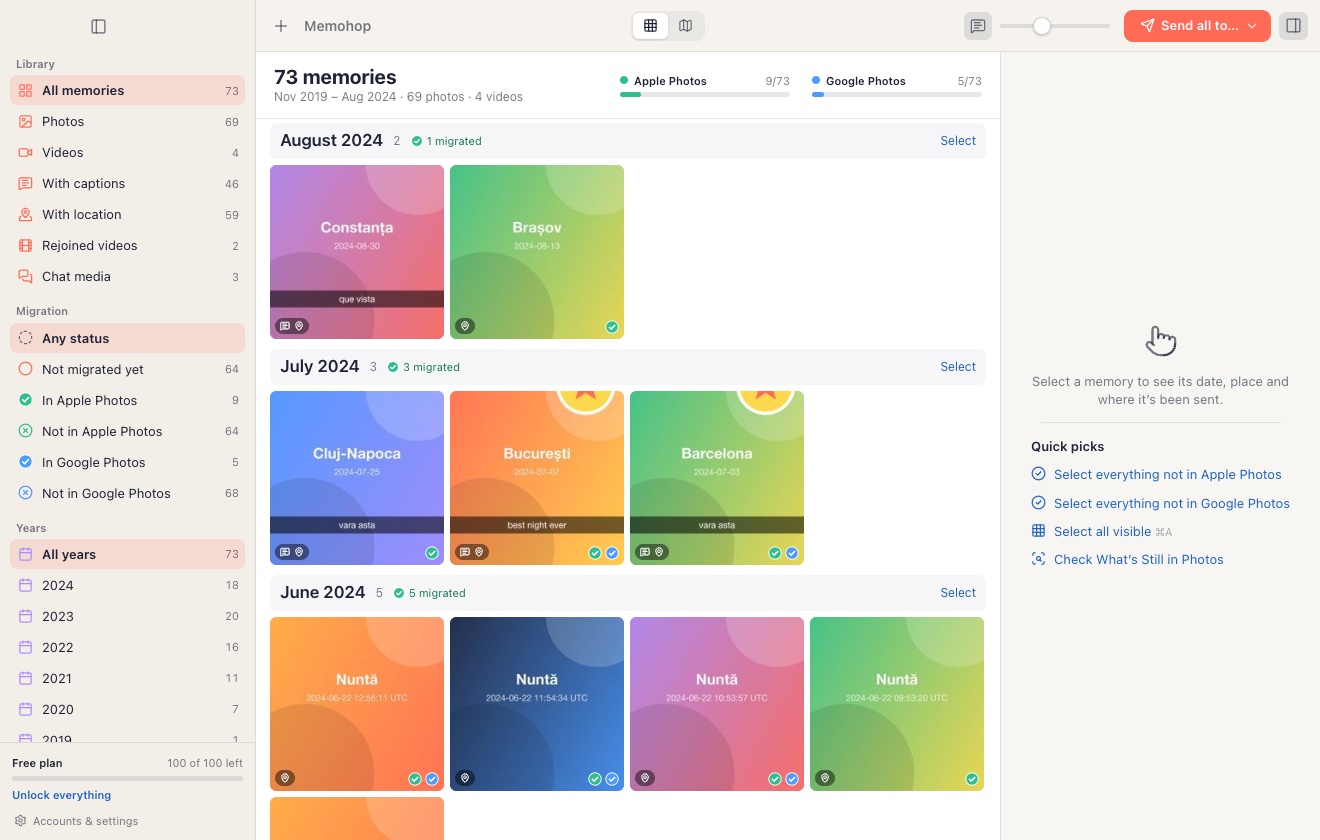
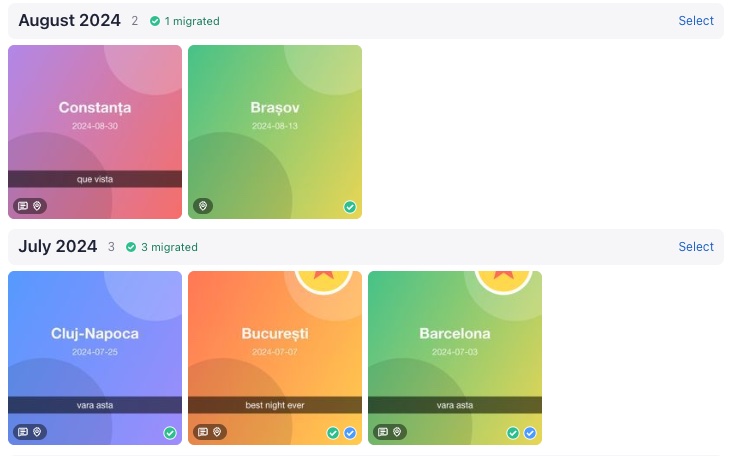
Green and blue checks show what’s already in Apple Photos and Google Photos — so you never upload twice.
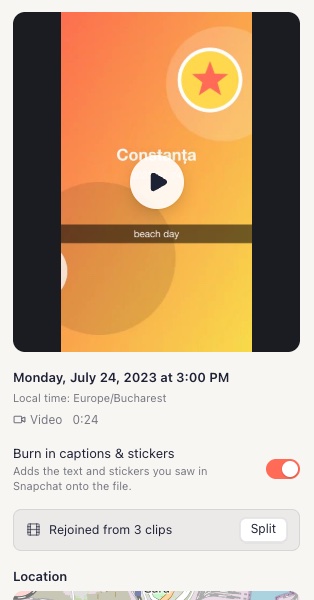
Real date and place on a map, captions back on, and split videos rejoined into one clip.
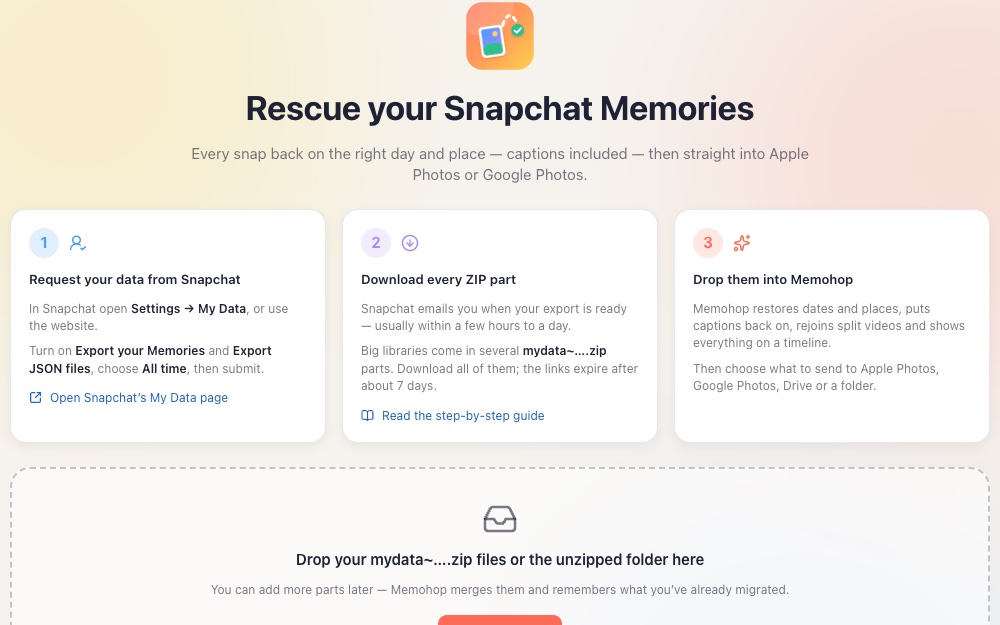
Memohop walks you through requesting your export from Snapchat and dropping the ZIP files in.
Features
The official export is a pile of files with random names, dated the day you downloaded them. Memohop turns it back into memories.
Every photo and video gets its original date, time and GPS location written into its metadata — so it lands on the right day, and on the map.
Text, stickers and drawings go back onto your photos and videos, just like you saved them. Prefer the clean version? Switch it off per memory.
Snapchat chops longer videos into 10-second pieces. Memohop stitches them back into one smooth video.
Publish directly to Apple Photos / iCloud Photos or Google Photos, neatly collected in a “Snapchat Memories” album. (Google Photos publishing is rolling out as Google approves our access.)
Browse everything by year and month. Filter by photos, videos, location, captions — or what hasn’t been migrated yet.
Badges show which memories are already in Apple Photos or Google Photos, and duplicate detection skips the copies.
If your export only contains download links, Memohop downloads each memory for you — then fixes it like all the others.
Prefer files? Save to a folder, a ZIP or Google Drive. Chat media is handled too, sorted and dated.
All the work happens on your computer. When you publish, files go directly to Apple Photos or to your own Google account — never through us.
Why now
Years of your life are sitting inside one app. That’s a fragile place to keep them.
Your memories deserve to live in your photo library: backed up, searchable, on the right day. That’s exactly what Memohop is for.
Download for Mac — freeDownload for Windows — freeSnapchat now caps free Memories storage and charges for more. The day you stop paying, getting your memories out is up to you.
The official download is a stack of ZIP files with random file names, dated the day you downloaded them — not the day you took them.
Captions, stickers and drawings are saved as separate overlay files, and longer videos arrive in 10-second pieces.
Snapchat’s export can only be downloaded for a few days, and older exports rely on links that stop working. Miss the window and you start all over again.
Compare
Plenty of tools can unzip an export. Few get your memories all the way home.
| Feature | Memohop | SnapEasy | FixMyExport | Free scripts |
|---|---|---|---|---|
| Real dates & GPS restored | Yes | Yes | Yes | Partial |
| Captions, stickers & drawings | Yes | Yes | Yes | Partial |
| Split videos rejoined | Yes | Yes | Yes | Partial |
| Publish to Apple Photos / iCloud | Yes | In progress | Partial | No |
| Publish to Google Photos | Yes | In progress | No | No |
| See what’s already migrated | Yes | No | No | No |
| Timeline & selective export | Yes | No | No | No |
| 100% local processing | Yes | Partial | Yes | Yes |
| Free preview before you pay | Yes | No | Yes | Yes |
| Languages | EN · RO · ES · PT | EN | EN · DE · FR · NL | EN |
| Windows | Yes | Yes | Yes | Yes |
Pricing
See your whole timeline before you spend a cent. No subscription, ever.
Preview everything
Free
Everything, forever
Regular price: $14.99Launch price: $9.99one-time payment
Pay with card, Apple Pay or Google Pay. Prices are in US dollars.
Secure checkout with Stripe.
FAQ
The things people ask us most. Can’t find yours? Just write to us.
You can import your exports and preview your entire timeline for free, and process & publish up to 100 memories. To move everything, get the Lifetime license for a one-time $9.99 — no subscription.
No. Memohop does all the work on your computer. When you publish, files go straight from your computer to Apple Photos (and iCloud, if you use it) or to your own Google Photos account. They never pass through our servers.
In Snapchat, go to Settings → Privacy Controls → My Data, include your Memories and submit the request. Snapchat emails you when your ZIP files are ready. Our step-by-step guide has all the details.
Yes. Memohop reads the original date, time and location from your export and writes them into each photo’s EXIF data and each video’s QuickTime metadata. Apple Photos and Google Photos then put them on the right day, and on the map.
Yes. Memohop burns the overlays back onto your photos and videos, exactly as you saved them. You can switch it off for any memory if you’d rather keep the clean original.
Memohop detects the clips that belong together and rejoins them into a single video.
Still curious? Write to us at [email protected] — a real person will answer.
Download Memohop, drop in your export and watch years of snaps fall back into place. Free to try.